

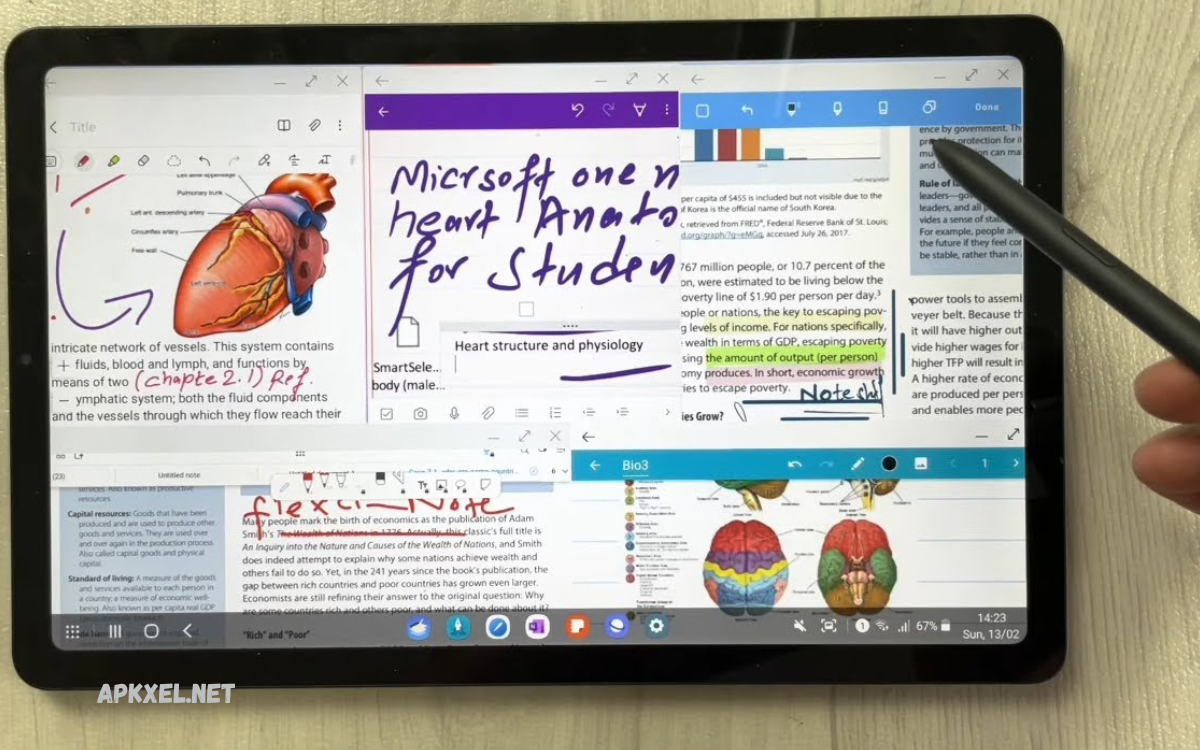
Note-taking apps for Android have become essential tools for students, professionals, and anyone who wants to stay organized in a fast-paced digital world. These apps allow users to quickly capture ideas, create to-do lists, save important information, and organize thoughts in a structured and accessible way.
With just a smartphone, users can store meeting notes, lecture summaries, project plans, and personal reminders all in one place. Many modern apps also include advanced search options, tagging systems, and folders to help users easily locate their notes whenever needed.
What Are Note-Taking Apps for Android?
Note-Taking Apps for Android are mobile applications designed to help users create, store, and manage notes digitally. These notes can include text, images, audio recordings, checklists, links, and files.
Unlike traditional notebooks, these apps offer:
- Instant saving and editing
- Cloud synchronization across devices
- Search and tagging systems
- Secure storage with encryption
- Backup and restore options
They are designed to simplify information handling and improve accessibility anytime, anywhere.
Importance of Note-Taking Apps for Android
In today’s fast-moving digital world, information overload is common. Managing this information manually becomes difficult. Note-Taking Apps for Android solve this issue effectively.
1. Improved Productivity
Users can quickly capture ideas without delay, reducing the chance of forgetting important details.
2. Organized Workflow
Notes can be categorized into folders, tags, and labels for structured access.
3. Time Efficiency
Search features allow users to find notes instantly without scrolling through pages.
4. Accessibility
Cloud-based systems ensure notes are accessible from multiple devices.
5. Paperless System
Reduces dependency on physical notebooks and supports eco-friendly digital habits.
Key Features of Note-Taking Apps for Android
Modern Note-Taking Apps for Android come with advanced features that go beyond simple text storage.
1. Cloud Synchronization
Notes automatically sync across Android phones, tablets, and desktops.
2. Voice-to-Text Input
Users can speak and convert speech into written notes instantly.
3. Multimedia Support
Add images, videos, audio files, and documents to enhance notes.
4. Search Functionality
Powerful search tools help locate specific keywords or content within seconds.
5. Offline Mode
Access and edit notes without internet connectivity.
6. Security Features
Password protection, fingerprint lock, and encryption ensure data safety.
7. Collaboration Tools
Share notes with teams or classmates for real-time editing and updates.
Types of Note-Taking Apps for Android
Different users require different functionalities. Note-Taking Apps for Android are available in several categories.
1. Basic Text Note Apps
Simple apps designed for quick note creation and editing.
2. Advanced Productivity Apps
Include task lists, reminders, calendars, and project management tools.
3. Cloud-Based Apps
Focus on syncing data across multiple devices and platforms.
4. AI-Powered Note Apps
Use artificial intelligence for summarization, suggestion, and organization.
5. Creative Note Apps
Support drawing, sketching, and handwritten notes.
Benefits of Using Note-Taking Apps for Android
Using Note-Taking Apps for Android provides multiple advantages for personal and professional use.
1. Better Organization
All notes remain structured in folders and categories.
2. Enhanced Memory Support
Important information stored digitally reduces mental pressure.
3. Easy Sharing
Users can share notes via email, messaging apps, or cloud links.
4. Cross-Device Sync
Notes remain updated across smartphones, tablets, and computers.
5. Increased Efficiency
Fast capture and retrieval of information improve workflow speed.
Note-Taking Apps for Android in Education
Students benefit significantly from Note-Taking Apps for Android. These apps help in:
- Recording lecture notes
- Storing study materials
- Creating revision lists
- Organizing subject-wise content
- Sharing notes with classmates
Digital note-taking also helps students revise quickly before exams and avoid missing important details during lectures.
Note-Taking Apps for Android in Business
In professional environments, Note-Taking Apps for Android play a crucial role in productivity.
They are used for:
- Meeting notes
- Project planning
- Task management
- Brainstorming ideas
- Client communication records
Business professionals use these apps to stay organized and ensure a smooth workflow.
Popular Use Cases of Note-Taking Apps for Android
Note-taking applications are used in multiple real-life scenarios:
- Daily to-do lists
- Shopping lists
- Travel planning
- Personal journaling
- Goal setting
- Idea collection
These apps adapt to both personal and professional lifestyles
How to Choose the Best Note-Taking Apps for Android
Choosing the right app depends on user requirements.
1. Ease of Use
The interface should be simple and user-friendly.
2. Feature Set
Check for essential features like sync, search, and multimedia support.
3. Storage Options
Cloud storage is important for backup and accessibility.
4. Security
Ensure strong encryption and privacy controls.
5. Compatibility
The app should work smoothly across multiple Android versions and devices.
Future of Note-Taking Apps for Android
The future of Note-Taking Apps for Android is driven by artificial intelligence and automation.
Upcoming trends include:
- AI-generated summaries
- Smart organization of notes
- Voice assistant integration
- Predictive note suggestions
- Real-time translation features
These innovations will make note-taking faster, smarter, and more personalized.
Tips to Maximize Productivity with Note-Taking Apps for Android
To get the best results, users should follow these tips:
- Use tags for better organization
- Keep notes short and clear
- Regularly sync data to the cloud
- Use voice input for quick capture
- Categorize notes into folders
- Backup important data frequently
These habits improve efficiency and reduce clutter.
Common Mistakes to Avoid
Many users do not fully utilize Note-Taking Apps for Android due to common mistakes:
- Keeping unorganized notes
- Ignoring backup options
- Using too many apps simultaneously
- Not using search features
- Avoiding cloud sync setup
Avoiding these mistakes improves overall productivity.
Frequently Asked Questions
Can I use Note-Taking Apps for Android offline?
Yes, most modern apps allow offline note creation and editing, which sync automatically when the internet is available.
Are Note-Taking Apps for Android safe for storing personal data?
Yes, many apps include security features such as encryption, fingerprint lock, and password protection to ensure data safety.
Can I access my notes on multiple devices?
Yes, cloud-based Note-Taking Apps for Android allow access across smartphones, tablets, and desktops using the same account.
Which is better: handwritten or digital note-taking?
Digital note-taking is faster, more organized, searchable, and accessible anywhere, making it more efficient than traditional handwritten notes.
Can students benefit from note-taking apps on Android?
Yes, students can easily store lecture notes, organize study materials, and revise content quickly before exams.
Do Note-Taking Apps for Android support images and audio?
Yes, many apps allow users to add images, audio recordings, videos, and documents within notes for better understanding.
What is the future of Note-Taking Apps for Android?
The future includes AI-powered summaries, smart organization, voice assistants, and real-time collaboration features for improved productivity.
Conclusion
Note-taking apps for Android have become essential tools in modern digital life. They simplify information management, improve productivity, and support both personal and professional tasks. With advanced features like cloud sync, AI integration, and multimedia support, these apps go far beyond traditional note-taking methods.
For professionals and general users alike, Note-Taking Apps for Android provide a reliable, fast, and efficient way to capture and manage information in one place.
