

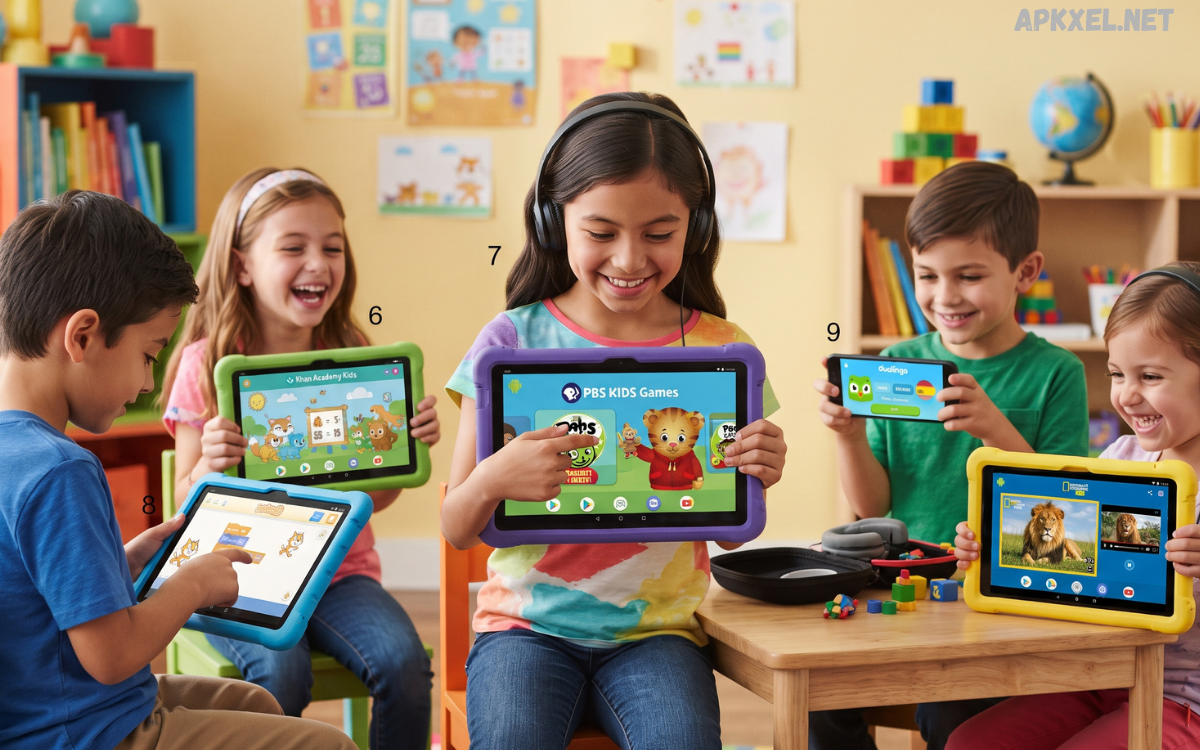
Choosing the right apps for children can make an Android smartphone or tablet much more useful. Instead of allowing kids to spend unlimited time on random games or entertainment platforms, parents can introduce applications that combine learning, creativity, problem-solving, and age-appropriate entertainment.
Android offers thousands of applications designed for young users, but quality varies considerably. Some apps provide meaningful educational activities, while others focus primarily on advertisements, repetitive gameplay, or unnecessary purchases.
What Are the Best Android Kids Apps?
The Best Android Kids Apps are applications specifically designed to provide children with safe, engaging, educational, or creative experiences on Android smartphones and tablets. Depending on a child’s age, these apps can support early learning, reading, mathematics, science, drawing, music, language development, puzzles, coding, and general knowledge.
A strong kids app should offer an intuitive interface, age-appropriate content, clear navigation, and activities that encourage active participation. The best applications do more than keep children occupied. They help children explore concepts, practice skills, solve problems, express creativity, and develop curiosity through interactive experiences.
Why Parents Should Choose Kids-Friendly Android Apps
Children can learn effectively through interactive digital activities when the content is carefully selected. Educational applications can provide visual explanations, interactive exercises, quizzes, stories, puzzles, and creative challenges that may complement traditional learning. A well-designed app can also allow children to practice repeatedly without feeling pressured by classroom expectations.
Parents also benefit from choosing dedicated kids applications because many provide additional controls and child-focused features. Depending on the application, these may include restricted content, parental settings, progress tracking, offline activities, limited advertisements, or controlled purchases. Selecting suitable apps can create a more structured digital environment for children.
1. Khan Academy Kids
Khan Academy Kids is one of the strongest choices for younger children who need a combination of education and interactive activities. The app introduces subjects such as reading, mathematics, language, logic, and social-emotional development through colorful lessons, stories, games, and exercises. Its child-friendly interface makes navigation relatively simple for young learners.
The application can be particularly useful for children who enjoy learning through short activities rather than long lessons. Parents can use it as an additional learning resource at home, while children can practice fundamental concepts at their own pace. Its broad educational coverage makes it a valuable option when searching for the Best Android Kids Apps for early learning.
2. YouTube Kids
YouTube Kids provides a version of video entertainment designed specifically for children. It offers access to cartoons, educational videos, music, stories, science content, creative activities, and other child-oriented programming. Parents can use available controls to create a more appropriate viewing environment for younger users.
However, parents should still remain involved when children use video platforms. Even child-focused services require sensible supervision and settings. Parents should review available controls, screen-time limits, content preferences, and viewing habits. Used responsibly, YouTube Kids can provide educational and entertaining video content.
3. Duolingo ABC
Duolingo ABC focuses on early reading and literacy development. The application introduces children to letters, sounds, words, spelling, and basic reading skills through interactive lessons. Short activities can make repeated practice feel more like a game than conventional studying.
The app can be useful for children who are beginning their reading journey. Visual elements and interactive exercises can help reinforce fundamental literacy concepts. Parents looking for Best Android Kids Apps that support early education can consider literacy-focused applications such as Duolingo ABC alongside traditional books and reading activities.
4. ScratchJr
ScratchJr introduces young children to the basic concepts behind programming and computational thinking. Instead of requiring children to write complicated programming code, the app uses visual programming blocks that allow them to create simple interactive stories, animations, and games.
This approach encourages children to think logically, organize sequences, experiment with ideas, and understand cause and effect. ScratchJr is especially valuable for parents who want to introduce technology as a creative tool rather than simply an entertainment platform. Children can build projects while developing problem-solving and storytelling skills.
5. PBS KIDS Games
PBS KIDS Games provides educational games based on familiar children’s programming and learning themes. Activities can cover mathematics, science, reading, creativity, problem-solving, and general knowledge. The game-based structure makes learning more engaging for children who prefer interactive experiences.
Parents can use these activities as supplementary learning rather than replacing formal education. Different games target different skills, allowing children to explore several subjects through one platform. Its educational focus makes it a strong candidate for families searching for reliable Best Android Kids Apps.
6. ABCmouse
ABCmouse is designed as a broad educational platform for young children. It provides activities covering reading, mathematics, science, art, music, and other early-learning subjects. Lessons are organized around structured educational content, giving parents an alternative to completely unstructured screen time.
The platform can be useful for families looking for a more comprehensive digital learning environment. Children can move through different activities while practicing foundational skills. Parents should review the current subscription structure and available features before choosing it, especially if they want a long-term educational platform.
7. Google Arts & Culture
Google Arts & Culture can introduce older children to art, history, landmarks, museums, and cultural subjects. Although it is not exclusively designed as a children’s app, its extensive educational material can become a valuable resource when used with parental guidance.
Children can explore famous artworks, historical locations, cultural collections, and educational stories. Parents can turn the app into a starting point for discussions and research projects. Instead of passive entertainment, this type of application can encourage curiosity and independent exploration.
8. Toca Boca Games
Toca Boca develops creative digital experiences that allow children to explore characters, environments, storytelling, and imaginative play. Many of its games are designed around open-ended interaction instead of traditional win-or-lose mechanics.
Creative play can help children develop storytelling abilities, imagination, decision-making, and self-expression. Parents should check individual applications because features, pricing, age recommendations, and in-app purchases can differ between titles. Toca Boca products can nevertheless be useful additions to a collection of Best Android Kids Apps focused on creativity.
9. LEGO Apps
LEGO offers several applications and digital experiences that can appeal to children interested in construction, creativity, storytelling, and problem-solving. LEGO-based activities can connect physical play with digital experiences, allowing children to explore familiar concepts in a different format.
Construction-focused play encourages children to experiment with structures, patterns, designs, and solutions. Parents can improve the learning value by combining digital activities with physical LEGO building. This creates a balanced experience that does not depend entirely on screen interaction.
10. Epic: Kids’ Books & Reading
Epic provides children with access to digital books and educational reading material. A large digital library can encourage children to explore stories and develop a regular reading habit, particularly when physical books are not immediately available.
Reading apps are most effective when parents help children choose age-appropriate material and discuss what they read. Digital reading should complement physical books rather than completely replace them. For children who enjoy tablets, a reliable reading application can turn the device into a useful educational resource.
11. Google Family Link
Google Family Link is different from typical children’s entertainment or education applications because its primary purpose is parental management. It can help parents manage aspects of a child’s Android device, depending on supported features, account configuration, device compatibility, and current Google policies.
Parents can use family-management tools to establish healthier technology habits. Features can include managing applications, reviewing activity, setting screen-time controls, and controlling certain device settings. Family Link should be viewed as a supporting tool rather than a substitute for communication and active parenting.
12. Math Kids
Math-focused applications can help children practice addition, subtraction, multiplication, division, counting, and other foundational concepts. Math Kids is an example of an application built around interactive mathematics exercises for younger learners.
The advantage of game-based mathematics practice is repetition. Children can solve multiple problems while receiving immediate feedback, which can reinforce concepts over time. Parents should select activities that match the child’s current ability so the experience remains challenging without becoming frustrating.
13. PBS KIDS Video
PBS KIDS Video focuses on educational and entertaining video programming for children. Its content can introduce young viewers to subjects such as science, literacy, mathematics, social skills, and general knowledge through age-appropriate programs.
Parents should still establish sensible viewing limits because educational content is not automatically beneficial when consumed excessively. Short, purposeful viewing sessions can provide entertainment and learning while leaving enough time for physical activity, reading, creative play, and family interaction.
14. Coding Apps for Kids
Coding applications can introduce children to programming concepts through puzzles, visual blocks, animations, and interactive challenges. Children do not necessarily need advanced mathematics or technical knowledge to begin learning computational thinking.
The Best Android Kids Apps for coding should focus on experimentation and problem-solving rather than overwhelming children with complicated terminology. Visual programming platforms are particularly suitable for beginners because children can see how individual commands affect characters and objects. This makes programming concepts easier to understand.
15. Drawing and Coloring Apps
Drawing and coloring applications provide children with digital tools for creative expression. They can experiment with shapes, colors, patterns, characters, and simple illustrations without needing a large collection of physical materials.
Creative apps can also support fine motor practice and visual thinking. Parents should encourage children to use these applications as one creative activity among many. Traditional drawing with paper, pencils, crayons, and paint remains important because children benefit from different forms of hands-on artistic expression.
Read Also: Android Lifestyle Apps: The Best Apps to Improve Your Everyday Life in 2026
Educational Benefits of Android Kids Apps
The right application can support several areas of childhood development. Educational apps can provide repeated practice in mathematics and literacy, while puzzle games can encourage logical thinking. Drawing and storytelling applications can support creativity, while coding tools can introduce sequencing and computational concepts.
Interactive learning can also provide immediate feedback. When children receive information about their answers, they can identify mistakes and try again. This process can make learning more engaging. However, digital applications work best as supplements to real-world experiences, classroom instruction, books, physical activities, and conversations with parents.
How to Choose the Best Android Kids Apps
Parents should begin by considering the child’s age and developmental stage. An application designed for preschool children may be too simple for an older child, while an advanced learning platform may frustrate a younger learner. Checking age recommendations and reading the application’s description can help parents make a suitable choice.
Parents should also examine privacy, advertising, purchases, permissions, and account requirements. An application requesting unnecessary permissions deserves additional scrutiny. Parents should prefer apps with transparent policies and sensible child-safety features. The goal is not simply to find an entertaining app but to find an application that provides genuine value without creating unnecessary digital risks.
Safety and Privacy Considerations
Children may not understand the importance of personal information, passwords, location data, or online communication. Parents should therefore pay attention to the permissions and features associated with every application. Apps that include social interaction, messaging, public profiles, or user-generated content require additional supervision.
Parents should also avoid allowing children to use unrestricted devices without appropriate safeguards. Strong account security, parental controls, age-appropriate settings, and regular reviews can reduce potential risks. Children should gradually learn why privacy matters rather than simply being given a collection of restrictions.
Managing Screen Time for Children
Even the Best Android Kids Apps should not become a replacement for sleep, exercise, schoolwork, family time, outdoor play, or social interaction. Parents should establish a balanced routine in which digital activities have a clear place rather than dominating the child’s daily schedule.
Screen-time rules should also consider the type of activity. Educational reading, creative drawing, video calls with family, passive entertainment, and competitive gaming do not provide identical experiences. Parents can encourage children to take regular breaks and transition between digital activities and physical or creative activities.
Free vs Paid Android Kids Apps
Many children’s applications offer free content, while others use subscriptions, one-time purchases, advertisements, or premium features. Free applications can be useful, but parents should not assume that free automatically means better. Advertising, locked content, tracking, or frequent purchase prompts can reduce the overall quality of the experience.
Paid applications can sometimes provide more structured content and fewer distractions. Before paying, parents should check the application’s features, subscription terms, supported devices, age range, and cancellation conditions. A suitable app should provide enough educational or creative value to justify its cost.
Offline Android Kids Apps
Offline functionality can be particularly valuable for families who want to reduce internet dependence. Applications that allow children to access downloaded books, educational activities, puzzles, or creative tools without an active connection can make devices more practical during travel.
Offline apps can also reduce exposure to online content while children are using the device. Parents should download and test content before giving the device to a child. This creates a more controlled environment and prevents unnecessary browsing when an internet connection is available.
Best Android Kids Apps for Different Age Groups
For preschool children, parents can focus on applications involving letters, numbers, colors, shapes, stories, music, drawing, and basic problem-solving. Activities should be simple, visually clear, and short enough to maintain attention. Educational repetition is useful at this stage because children often learn through repeated exposure.
Elementary-age children can explore reading, mathematics, science, coding, geography, art, and more advanced puzzles. Older children can gradually move toward research tools, programming platforms, language-learning applications, and creative software. The best choice depends on individual interests and developmental needs rather than age alone.
Best Android Kids Apps for Learning English
Language-learning applications can help children develop vocabulary, pronunciation, listening, and reading skills. Interactive exercises can make repetition more enjoyable than memorizing vocabulary from a traditional list. Parents can strengthen results by encouraging children to use new words in everyday conversations.
English-learning apps should complement real communication. Children learn language more effectively when they hear, speak, read, and write regularly. Parents can use app-based lessons as short practice sessions and then reinforce the same vocabulary through books, conversations, games, and daily activities.
Best Android Kids Apps for Creativity
Creativity-focused applications allow children to draw, design, animate, build, compose music, and create stories. These activities can be especially valuable for children who lose interest in conventional educational exercises.
Parents should encourage children to create rather than simply consume. For example, instead of watching a long series of videos, a child could spend part of the session creating a drawing, designing a character, building a digital scene, or developing a simple story. This transforms screen time into active participation.
Best Android Kids Apps for Problem-Solving
Puzzle games and logic applications can encourage children to analyze situations, recognize patterns, test solutions, and think strategically. These skills are useful beyond gaming because problem-solving is relevant to mathematics, science, programming, and everyday decision-making.
Parents should select challenges appropriate to the child’s ability. A good puzzle should require thought without becoming unnecessarily frustrating. Children can also benefit when parents ask them to explain how they reached an answer rather than focusing only on whether the answer was correct.
How Parents Can Make Kids Apps More Educational
Parents can increase the educational value of apps by participating occasionally. Asking children what they learned, why they selected an answer, or how they created something can turn individual screen use into a shared learning experience.
Another effective approach is connecting digital activities to real-world experiences. A child learning about animals through an app could visit a zoo or read an animal book. A child practicing mathematics could use the skills while shopping or cooking. A child learning coding could create a simple project and explain how it works to the family.
Common Mistakes Parents Should Avoid
One common mistake is installing too many applications at once. A large collection can overwhelm children and make it difficult for parents to identify which apps are actually useful. A smaller selection of high-quality applications is usually more practical than a device filled with games and educational tools that rarely get used.
Another mistake is treating educational apps as a complete substitute for teaching. Digital applications can support learning, but they cannot replace teachers, parents, books, physical activity, social interaction, and hands-on experiences. Parents should view apps as tools that support a broader learning environment.
Frequently Asked Questions
What are the Best Android Kids Apps for learning?
The Best Android Kids Apps for learning include applications focused on reading, mathematics, science, languages, coding, and problem-solving. Parents should choose apps according to the child’s age, interests, and learning level.
Are Android kids apps safe for children?
Many Android kids apps are designed with child-friendly features, but safety depends on the individual application. Parents should check permissions, privacy policies, advertisements, purchases, and parental controls before allowing children to use an app.
What are the Best Android Kids Apps for preschoolers?
Preschool children can benefit from apps focused on letters, numbers, colors, shapes, stories, music, drawing, and basic problem-solving. Simple interfaces and short interactive activities are generally more suitable for younger children.
Can kids learn coding through Android apps?
Yes. Several Android applications introduce coding through visual programming, puzzles, animations, and interactive challenges. These apps can help children develop logical thinking, sequencing, creativity, and problem-solving skills.
Are there free Android kids apps?
Yes. Many educational, creative, reading, and entertainment apps offer free versions. Parents should check whether free apps contain advertisements, in-app purchases, subscriptions, or restricted content before installation.
Which Android kids apps help improve reading skills?
Reading-focused apps can help children learn letters, phonics, vocabulary, spelling, comprehension, and storytelling. Parents should choose applications that match the child’s reading level and encourage regular practice.
Can Android kids apps improve mathematics skills?
Yes. Mathematics apps can provide interactive practice with counting, addition, subtraction, multiplication, division, patterns, and basic problem-solving. Game-based exercises can make repeated practice more engaging.
How can parents control children’s screen time?
Parents can establish daily screen-time limits, encourage regular breaks, and use parental-control features available on Android devices. Screen use should remain balanced with sleep, exercise, schoolwork, reading, outdoor activities, and family time.
Are offline kids apps available for Android?
Yes. Some Android kids apps provide downloadable books, lessons, puzzles, games, and creative activities that work without an internet connection. Offline functionality can be useful during travel and can reduce children’s exposure to online content.
How should parents choose the best kids apps for Android?
Parents should consider age suitability, educational or creative value, privacy, advertisements, in-app purchases, permissions, parental controls, offline functionality, and reviews. A small selection of high-quality apps is usually better than installing numerous applications.
Conclusion
The Best Android Kids Apps can transform an Android smartphone or tablet into a useful platform for education, creativity, reading, problem-solving, and age-appropriate entertainment. Applications such as Khan Academy Kids, ScratchJr, PBS KIDS, Duolingo ABC, drawing tools, reading platforms, and coding apps can support different aspects of childhood development.
The most important factor is not how many apps a child has installed but how effectively those apps are used. Parents should evaluate age suitability, educational value, privacy, advertising, purchases, screen-time requirements, and safety features before installing an application.
