

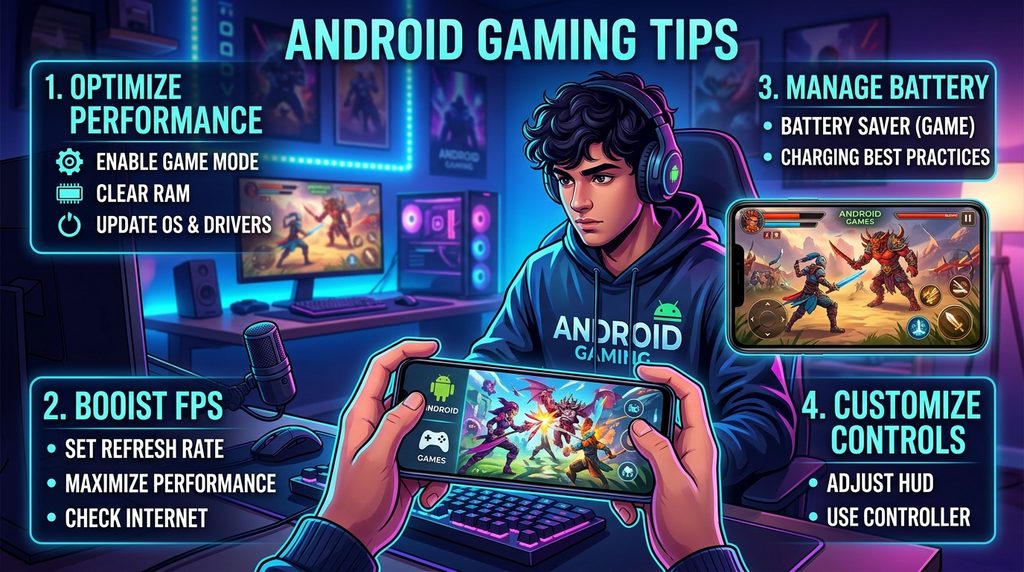
Android gaming has become a popular way to enjoy competitive matches, adventure titles, racing games, strategy games, and multiplayer experiences. The right Android gaming tips can help players improve device performance, reduce distractions, optimize controls, manage battery usage, and create a smoother gaming experience.
A powerful gaming experience does not depend only on expensive hardware. Proper device settings, stable internet, suitable graphics options, regular maintenance, and smart gameplay habits can make a noticeable difference across many Android games.
Optimize Your Android Device Before Gaming
Before starting a demanding game, close unnecessary applications running in the background. Background apps can consume RAM, processor resources, battery power, and network bandwidth, leaving fewer resources available for the game.
Removing unnecessary background activity can also reduce interruptions during gameplay. Players should keep essential services active while limiting applications that are not required during a gaming session.
Keep Android Updated
Android system updates can include performance improvements, security fixes, compatibility changes, and device optimizations. Keeping the operating system updated can help maintain stable performance with newer versions of games.
Game developers also release updates that improve gameplay, fix bugs, optimize performance, and introduce new content. Installing trusted system and game updates can provide better compatibility and reduce avoidable technical problems.
Free Up Storage Space
Low storage can affect overall device performance and make managing large games more difficult. Removing unused applications, duplicate files, old downloads, and unnecessary media can create additional free space.
A healthy amount of available storage also makes future game updates easier to install. Players should review storage regularly and remove files that are no longer useful instead of allowing storage to remain nearly full.
Choose Suitable Graphics Settings
High graphics settings can produce impressive visuals, but they also place greater demands on the processor and graphics hardware. Players should choose settings that maintain stable gameplay rather than automatically selecting the highest visual quality.
Medium or optimized graphics can provide a useful balance between image quality and performance. For competitive games, stable frame delivery can be more valuable than additional visual effects that place unnecessary pressure on the device.
Improve Frame Rate Stability
Frame rate affects how smoothly movement, animations, camera transitions, and actions appear on screen. A stable frame rate can make gameplay feel more responsive, particularly during fast multiplayer matches.
If a game offers multiple frame-rate options, test the available settings and select a level the device can maintain consistently. Reducing demanding visual effects can sometimes help achieve more stable performance during longer sessions.
Manage Device Temperature
Heat can become a major concern during extended gaming sessions, especially when the processor and graphics hardware remain under heavy load. Excessive temperature may lead to performance reductions as the device attempts to control heat.
Play in a cool, ventilated environment and avoid covering the device with thick materials while gaming. Taking short breaks during lengthy sessions can also give the device an opportunity to cool down naturally.
Improve Touch Controls
Touch controls have a direct effect on movement, aiming, camera control, and reaction speed. Spend time adjusting button positions, sizes, sensitivity, and other available control settings according to the game’s options.
A comfortable control layout can reduce accidental touches and make frequently used actions easier to reach. Players should practice with a new layout before using it in important competitive matches.
Adjust Sensitivity Settings
Sensitivity controls how quickly the camera or aiming system responds to finger movement. Very high sensitivity can make precise movements difficult, while extremely low sensitivity can require larger finger movements.
Start with moderate sensitivity and adjust one setting at a time. Testing changes inside practice areas can make it easier to understand how each adjustment affects aiming, camera movement, and overall control.
Use a Stable Internet Connection
Online games depend on reliable communication between the Android device and game servers. An unstable connection can cause delayed actions, sudden movement, connection errors, and temporary disconnections.
A stable Wi-Fi connection can provide consistent performance when the network is reliable. Players should also reduce unnecessary network activity during competitive sessions because large downloads or streaming activity can consume bandwidth.
Understand Ping and Latency
Ping represents the time required for data to travel between the device and a game server. Lower latency generally allows player actions and server responses to communicate more quickly.
Players should select the most suitable available server or region when a game provides that option. Choosing a geographically appropriate server can help reduce unnecessary network distance and improve connection consistency.
Reduce Unnecessary Notifications
Notifications can interrupt gameplay and distract attention during important moments. Incoming alerts may also cover parts of the screen or pull focus away from the game.
Use Android’s available notification controls or gaming features to reduce interruptions during sessions. Keep important communication options available when necessary while limiting nonessential alerts during focused gameplay.
Use Gaming Mode When Available
Many Android smartphones include a gaming mode or game optimization feature. Depending on the device, these tools may provide performance controls, notification management, touch optimization, screen recording, or other gaming-related functions.
Explore the gaming features included with the device and understand what each option does. Avoid enabling settings that create additional heat or battery consumption unless their benefits are useful for the particular game.
Manage Battery During Gaming
Gaming can consume significant battery power because the screen, processor, graphics hardware, speakers, and network components may operate continuously. Starting a long session with a sufficiently charged battery can prevent unexpected interruptions.
Battery-saving modes may reduce performance on some devices, so players should understand their effects before using them during demanding games. For competitive gameplay, a balanced device configuration may be preferable to aggressive power-saving settings.
Avoid Gaming While Charging for Long Periods
Charging generates heat, while demanding games can also increase device temperature. Combining intensive gaming with charging may increase thermal load depending on the device, charger, environment, and game.
When possible, allow the device to charge before starting a long session. If gaming while connected to power is necessary, keep the device in a cool and ventilated location and use a reliable charger designed for the device.
Keep the Screen Clean
Fingerprints, dust, and moisture can affect touch accuracy and screen visibility. A clean display allows fingers to move smoothly and helps players see important visual information clearly.
Use a suitable soft cleaning cloth and follow the manufacturer’s care guidance for the display. Avoid using excessive moisture or harsh cleaning products that could damage the screen or its protective coating.
Choose the Right Screen Brightness
Screen brightness affects visibility and battery consumption during gaming. Extremely high brightness can increase power usage, while very low brightness may make important details difficult to see.
Select a comfortable brightness level based on the surrounding environment. Automatic brightness can be useful for changing conditions, although some players may prefer manual control during consistent indoor gaming sessions.
Use Headphones for Better Audio Awareness
Audio provides valuable information in many games, including footsteps, vehicle movement, environmental sounds, alerts, and directional effects. Suitable headphones can make these audio cues easier to recognize.
Keep the volume at a comfortable level to protect hearing and maintain awareness of the surrounding environment. Players should also avoid relying on audio so heavily that they lose awareness of what is happening around them.
Learn the Game Mechanics
Strong performance comes from understanding game mechanics rather than depending entirely on device performance. Learn movement systems, weapon behavior, character abilities, maps, objectives, resource management, and other mechanics relevant to the game.
Practice modes and tutorials can provide useful environments for learning without the pressure of competitive matches. Understanding why an action works is often more valuable than simply repeating the same action without analyzing the result.
Practice Regularly
Consistent practice helps improve reaction time, movement accuracy, aiming, decision-making, and familiarity with controls. Short focused practice sessions can be more useful than playing for long periods without a clear goal.
Choose one skill to improve during each practice session. Concentrating on movement, aiming, positioning, strategy, or another specific area makes progress easier to recognize and evaluate.
Customize Your Control Layout
Every player has different preferences for button placement and control movement. A customized layout can make frequently used actions easier to access while reducing unnecessary finger movement.
Avoid changing the layout repeatedly without giving yourself time to adapt. Once you find a comfortable arrangement, practice with it consistently so muscle memory can develop naturally.
Use Practice Modes Effectively
Practice modes provide a safe environment for testing sensitivity, controls, movement techniques, weapons, characters, and other mechanics. They are particularly useful after changing settings or learning a new feature.
Instead of simply spending time in practice mode, create specific objectives. For example, practice accurate movement, camera control, target tracking, or quick transitions between different actions.
Learn From Your Gameplay
Reviewing gameplay can reveal mistakes that are difficult to notice while actively playing. Players can identify poor positioning, unnecessary movement, missed opportunities, weak decision-making, or ineffective control habits.
Focus on one or two improvements after each review rather than trying to change everything simultaneously. Gradual improvement creates more sustainable progress and makes new habits easier to maintain.
Improve Reaction and Decision-Making
Fast reactions are useful, but good decisions often determine the outcome of a match. Understanding when to attack, defend, reposition, retreat, collect resources, or support teammates can make gameplay more effective.
Build decision-making skills by observing situations before acting. Ask what information is available, what risks exist, and what action provides the strongest opportunity instead of reacting automatically.
Maintain a Comfortable Gaming Position
Long gaming sessions can place strain on the hands, neck, shoulders, and back when posture remains uncomfortable. A stable seating position and appropriate screen placement can make gaming more comfortable.
Take regular breaks and change position instead of remaining still for extended periods. Comfortable surroundings can help players maintain concentration without unnecessary physical discomfort.
Avoid Unnecessary Background Downloads
Automatic downloads can consume network bandwidth and sometimes affect gaming performance. Large application updates, cloud synchronization, or media downloads may compete with online games for connection resources.
Check which applications are using network resources when experiencing unexpected connection problems. Scheduling large downloads outside important gaming sessions can help keep network activity more predictable.
Choose Trusted Gaming Applications
Install games and supporting applications through reputable sources and keep account credentials private. Untrusted applications can create security and performance concerns that have nothing to do with the game itself.
Review requested permissions before installing unfamiliar applications. Avoid giving unnecessary access to personal information, files, contacts, or other device features when such permissions are not relevant to the application’s purpose.
Protect Your Gaming Account
A gaming account may contain progress, purchases, achievements, characters, or other valuable information. Strong account security helps reduce the risk of unauthorized access.
Use a unique password and enable available security features such as two-step verification. Never share passwords, verification codes, or private account information with other players or unknown websites.
Read Also: Free Entertainment Apps: Enjoy More Digital Fun Without Extra Cost
Control In-Game Spending
Many Android games include optional purchases, subscriptions, cosmetic items, or other digital content. Players should understand the cost of purchases and use appropriate spending limits.
Review purchase confirmations and account settings carefully. Avoid making rushed purchases during exciting moments, especially when an item is presented as limited or urgent.
Keep Your Games Organized
An organized Android device makes it easier to find games, updates, screenshots, recordings, and related files. Remove games that are no longer used and keep frequently played titles easy to access.
Organization also reduces unnecessary storage usage. Review large game files, recordings, and downloads periodically so the device remains ready for new content and updates.
Select Games Based on Device Capability
Not every Android device is designed for the same gaming workload. Processor performance, graphics capability, RAM, storage technology, display refresh rate, battery capacity, and thermal design can all affect gameplay.
Check a game’s requirements before installing demanding titles. Selecting games appropriate for the device can provide a better experience than forcing extremely demanding settings onto hardware that cannot maintain them consistently.
Understand Refresh Rate
A higher display refresh rate can make compatible games appear smoother during movement and camera transitions. However, the actual benefit depends on game support, device capability, performance stability, and battery usage.
Enable a higher refresh rate when it provides a noticeable benefit and the device can maintain suitable performance. If battery consumption or heat becomes a concern, compare the experience with a lower refresh-rate configuration.
Use Cloud Saves When Supported
Cloud saving can help protect game progress when supported by the game and account system. It may also make it easier to restore progress after changing devices or reinstalling a game.
Confirm that synchronization has completed before removing a game or resetting a device. Different games use different save systems, so players should understand how their particular game stores progress.
Take Regular Gaming Breaks
Regular breaks can help maintain concentration during extended gaming sessions. Continuous play can lead to tiredness, reduced focus, and less effective decision-making.
Use breaks as an opportunity to step away from the screen, move around, relax your eyes, and return with renewed attention. Short breaks can make longer gaming sessions feel more comfortable and focused.
Build a Smart Gaming Routine
A consistent routine can combine device preparation, gameplay practice, performance management, and breaks. Start by checking battery level, connection quality, storage, notifications, and game updates before an important session.
During gameplay, focus on specific objectives instead of playing without direction. Afterward, review performance, identify one improvement area, and adjust settings only when there is a clear reason to do so.
Best Android Gaming Tips for Beginners
Beginners should start with simple settings rather than changing every available option. Learn the controls, understand the game’s objectives, practice basic mechanics, and gradually adjust sensitivity or graphics according to personal experience.
Do not compare early performance with experienced players who have spent considerable time practicing. Progress becomes easier when beginners focus on learning fundamentals, developing consistent habits, and understanding the game at their own pace.
Android Gaming Tips for Competitive Players
Competitive players should prioritize consistency across controls, graphics, frame rate, connection quality, and gameplay habits. Small improvements in settings can become meaningful when combined with strong positioning, communication, awareness, and decision-making.
Avoid constantly changing sensitivity or controls after every difficult match. Give each configuration enough practice time to determine whether it genuinely improves performance instead of making decisions based on a single match.
Common Android Gaming Mistakes
One common mistake is using maximum graphics settings without considering performance stability. Another mistake involves ignoring device temperature, storage limitations, unstable connections, background applications, or notifications that interfere with gameplay.
Players can also lose progress by neglecting account security and save synchronization. A reliable gaming setup requires attention to both technical performance and responsible account management.
Frequently Asked Questions
What are the best Android gaming tips for better performance?
The best Android gaming tips include closing unnecessary background apps, keeping Android updated, freeing storage, optimizing graphics, and maintaining a stable internet connection. These steps can help create smoother and more consistent gameplay.
How can I improve FPS on an Android phone?
Reduce demanding graphics settings, disable unnecessary visual effects, close background applications, and keep sufficient storage available. If the game supports different frame-rate options, select a level your device can maintain consistently.
Does clearing storage improve Android gaming?
Having sufficient free storage can help maintain overall device performance and make game updates easier to install. Removing unused applications, old downloads, and unnecessary files can keep the device better prepared for demanding games.
How can I reduce lag while playing Android games?
Use a stable internet connection, select an appropriate game server, stop unnecessary downloads, and reduce background network activity. For offline games, performance-related lag may instead be connected to graphics settings, heat, or device limitations.
Should I use high graphics settings for Android games?
High graphics settings can improve visual quality but may increase processor and graphics workload. For smoother gameplay, choose settings that provide a stable frame rate rather than automatically selecting the highest available quality.
How can I reduce overheating during Android gaming?
Play in a cool, ventilated environment, avoid covering the device, reduce demanding graphics settings, and take breaks during extended sessions. Avoid exposing the phone to excessive heat while gaming.
Does gaming mode improve Android gaming?
Gaming mode can provide useful features such as notification management, performance controls, touch optimization, and other gaming tools. The available features vary by Android device, so results can differ between phones.
How can I improve touch controls in Android games?
Adjust button positions, sizes, and sensitivity according to your gameplay style. Practice with the new layout before competitive matches so your movements become more consistent and comfortable.
Is a stable internet connection important for online Android games?
Yes, online games depend on communication between the device and game servers. A stable connection can reduce connection interruptions, delayed actions, and sudden disconnections during multiplayer gameplay.
How often should I take breaks while gaming on Android?
Regular breaks are useful during extended gaming sessions because they can help maintain concentration and comfort. Step away from the screen periodically, change your position, and return when you feel refreshed.
Conclusion
The best Android gaming tips focus on creating a balanced experience rather than chasing maximum specifications. Optimized graphics, stable frame rates, responsive controls, reliable internet, sensible battery management, and regular practice can collectively improve mobile gaming.
Every Android device and game behaves differently, so experimentation remains important. Test settings gradually, monitor performance, protect your account, take regular breaks, and focus on developing skills that improve gameplay over time.

1 Comment
Pingback: Android Game Lists: Complete Guide to the Best Android Games- APKXel