

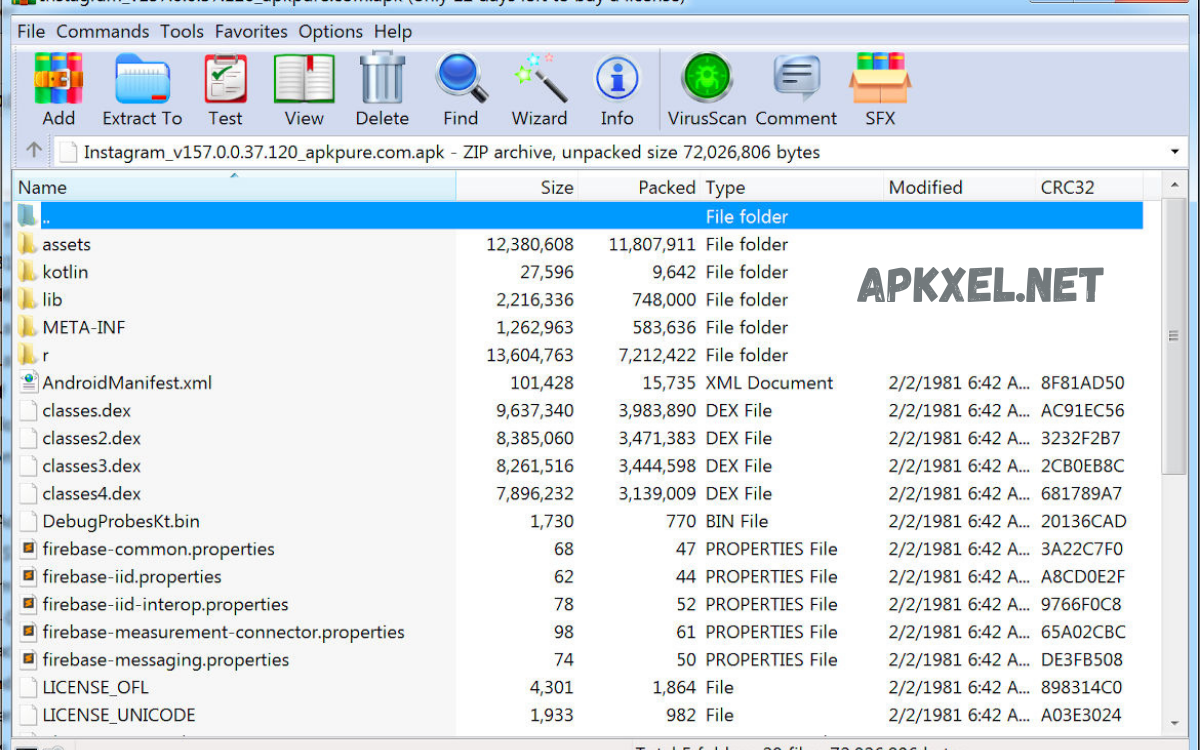
An APK (Android Package Kit) file is the standard format for distributing and installing applications on the Android operating system. Much like an EXE file on Windows or a DMG file on macOS, an APK contains all the components an Android app needs to function properly on a device.
An APK file is essentially a compressed archive that includes the app’s compiled code, resources, assets, certificates, and manifest file. The manifest plays a critical role by defining the app’s name, permissions, hardware requirements, and minimum Android version.
Historical Evolution APK File Formats
APK file formats originated with early Android platform releases. Inspired by Java JAR file formats, APK files use a ZIP compression format. Over time, APK file formats evolved, supporting larger applications, modular resources, and improved security.
Early APK file formats stored Dalvik bytecode inside classes.dex file. Later Android versions introduced ART runtime, enabling ahead-of-time compilation during installation. APK file formats are adapted without losing backward compatibility.
Modern APK file formats now coexist with newer formats such as Android App Bundles, yet APK remains a universal runtime format for Android devices install.
Core Structure APK File Formats
APK file formats are structured compressed archives containing standardized directories and files. Key components include:
AndroidManifest.xml
AndroidManifest.xml defines application identity. This file declares package name, application version, permissions, hardware requirements, activities, services, broadcast receivers. The Android system parses AndroidManifest.xml before approval for installation.
classes.dex
classes.dex stores compiled application bytecode. This bytecode is executed by the Android Runtime. Large applications may include multiple dex files, known as multidex support, packaged in APK files.
resources. arsc
resources .arsc contains precompiled application resources. This binary file maps resource identifiers, layouts, strings, images, and themes. Efficient resource access improves runtime performance.
assets Directory
The assets directory contains raw files that the application accesses directly. These files are not processed by the resource compiler. Common uses include fonts, configuration files, and offline data.
META-INF Directory
The META-INF directory stores digital signatures and certificates. These files verify the integrity and authenticity of the APK file format. The Android system rejects tampered APK files due to failed signature verification.
APK File Formats Build Process
APK file format creation follows a structured pipeline:
- Source code compilation Java, Kotlin , converted bytecode
- Resource compilation XML transformed binary
- Packaging all components ZIP-based APK file format
- Signing the APK file format’s developer certificate
- Optional alignment optimizing memory access
Android Studio and Gradle automate the entire process, ensuring consistent APK file formats output.
Signing APK File Formats
Signing APK file formats mandatory. Each APK file must include a cryptographic signature that verifies the developer’s identity. Android enforces the same-signature rule updates, meaning application updates must be signed with the same key.
Signing prevents malicious modification. Without a valid signature, APK file installations are blocked. Enterprises manage signing keys carefully due to irreversible trust implications.
APK File Formats Installation Process
During installation, the Android system performs multiple checks:
- Signature verification
- Manifest validation
- Permission review
- Resource extraction
- Bytecode optimization
Once installed, the APK file unpacks the application directory. System registers components, enabling execution.
Sideloading APK file formats requires enabling the unknown sources permission. This process bypasses official store review, increasing the user’s security responsibility.
Read Also: Top File Sharing Apps Similar to Xender
Security Considerations APK File Formats
APK file formats present security advantages and risks. Digital signatures protect integrity, but the source of distribution determines the trust level.
Common Security Risks
- Malware embedded in modified APK file formats
- Trojans masquerading as legitimate apps
- Privilege abuse via excessive permissions
Security Best Practices
- Download APK file formats from trusted publishers
- Verify developer signatures
- Review requested permissions
- Use mobile security tools
Organizations deploying internal APKs should implement checksum validation and secure distribution channels.
APK File Formats Optimization
Professional developers optimize APK file formats to improve performance and reduce size.
Size Reduction Techniques
- Resource shrinking
- Code obfuscation
- Image compression
- Removing unused libraries
Smaller APK file formats reduce download times, storage usage, and improve user adoption rates.
Performance Enhancements
- Efficient resource management
- ProGuard R8 optimization
- Multidex management
Well-optimized APK file formats contribute smoother runtime experience.
APK File Formats Variants
The modern Android ecosystem introduced APK file format variants:
Split APKs
Split APK file formats divide application components into device-specific configurations. Separate APKs contain the base code, language resources, and screen-density assets.
Universal APKs
Universal APK file formats bundle all resources into one file. Larger size, broader compatibility.
Instant Apps APK
Specialized APK file formats enable instant execution without full installation.
Despite variants, Android ultimately installs APK file formats internally.
APK File Formats Versus App Bundles
Android App Bundles represent a publishing format, not an install format. Developers upload bundles, and Google Play generates optimized APKs for each device.
APK file formats remain the final artifact installed on devices. Understanding differences helps deployment strategy decisions.
Enterprise Usage APK File Formats
Enterprises leverage APKs for internal app distribution. Common scenarios include:
- Internal tools
- Device management apps
- Kiosk solutions
- Testing builds
Mobile Device Management platforms silently deploy APK files on managed devices, enforcing security policies.
Legal, Ethical Aspects APK File Formats
APK file formats distribution is subject to licensing terms. Redistributing paid applications without permission violates copyright law. Modifying APK file formats may breach the terms of service.
Responsible usage ensures compliance with intellectual property rights.
Troubleshooting APK File Formats
Common issues include:
- Parsing errors
- Signature mismatch
- Incompatible Android versions
- Insufficient storage
Diagnosing requires reviewing log output, verifying manifest compatibility, and ensuring proper signing.
Future APK File Formats
APK file formats continue evolving. Android introduces incremental installation, dynamic features, and improved compression. However, APK file formats remain foundational due to backward compatibility requirements.
Future improvements likely focus on security hardening, modular delivery, and performance optimization.
Frequently Asked Questions
What are APK file formats?
APK file format is the Android Package Kit container used for Android application distribution, installation, and execution across Android devices.
Why are APK file formats important in the Android ecosystem?
APK file formats enable standardized app packaging, secure installation, version control, compatibility across diverse hardware, and Android versions.
What files include APK file formats?
APK file formats include AndroidManifest.xml and classes.dex, resources.arsc, res directory, assets directory, META-INF signature files.
Are APK file formats safe install?
APK file formats are safe when downloaded from trusted sources and from developers who have signed their apps. Unverified sources increase malware risk.
Can APK file formats be modified?
APK file formats are safe when downloaded from trusted sources and from developers who have signed their apps. Unverified sources increase malware risk.
Can APK file formats be modified?
APK file formats are technically modifiable, but modification breaks the digital signature. Unsigned or altered APK files fail installation unless they are resigned.
Conclusion
APK file formats constitute the backbone of Android application distribution. Their structured design, security mechanisms, and flexibility enable massive scalability across the Android ecosystem. Professionals who understand APK file formats gain deeper control over development, deployment, and optimization processes.
